00 · Who We Are
Innovior
InnoviorInstitute of Technology Studies

We Build the Digital Future
with Young Hands.

Innovior is Sri Lanka's premier technology company — engineering scalable software systems for enterprises while empowering the next generation of innovators through hands-on STEM education.

Our Innovior Kids Tech Academy (IITS) offers robotics, IoT, and coding programs for children aged 5–17 in Kundasale, Kandy. Today's Arduino workshop is a direct extension of that mission — we want every 15-year-old to understand that technology is something you build, not just consume.

Spark Juniors · Ages 4–8Spark Bots · Ages 9–13Spark Masters · Ages 14–17IoT Certificate
info@innovior.lk
+94 778 778 828
67/7/8 Nattaranpotha, Kundasale, Kandy
Today's Workshop

Why Are We Here?

We believe every student should have their "aha!" moment — that spark when code becomes motion, when a sensor reading changes a LED, when you built the thing that moved.

0:00–0:25

Spark — Intro to Arduino & Electronics

0:25–0:55

Senses — How sensors work + Ideas brainstorm

1:00–2:30

Build — Wire & code the IR remote car

2:45–3:00

Race Day — Compete & celebrate

🏢

Innovior (Pvt) Ltd

Enterprise software company building scalable digital solutions — Analytics, E-Commerce, Cloud, AI Automation.

Visit Website →
🎓

IITS Kids Tech Academy

Sri Lanka's premier STEM academy. Robotics, IoT, and coding for kids 5–17 in Kundasale, Kandy.

Visit Website →

Today's Goal

By 3:00 PM, every team will have wired, coded, and raced a real Arduino-powered remote control car.

Grade 8–9 Maker Lab · Half-day, 3 hours

Build it.
Code it.
Race it.

One afternoon, four sensors, one motor driver, and a remote control — by the end, every team drives a car they wired and programmed themselves.

0:00–0:25 · Spark
0:25–0:55 · Senses + Ideas
1:00–2:30 · Build the car
2:45–3:00 · Race day
ARDUINO UNOATmega328PUSB
Scroll to explore
— 01 · Spark

What is Arduino, really?

An Arduino is a tiny, programmable computer brain — small enough to fit inside a toy car, cheap enough to break without panic, and simple enough to learn in an afternoon. You write instructions on your laptop, upload them over USB, and the board carries them out forever, even after you unplug your computer.

Arduino Uno Diagram

Microprocessor (your laptop)

The brain in your laptop is powerful but needs a whole support team around it — separate memory chips, storage drives, a cooling fan, an operating system. It's built to juggle many apps at once.

Microcontroller (Arduino)

An Arduino's brain, memory, and input/output pins all live on one tiny chip. No operating system, no juggling — it runs one job, perfectly, over and over. That's exactly what a robot or sensor needs.

Arduino Uno

The classic beginner board. USB-programmable, 14 digital pins, 6 analog pins, huge community. What we're using today.

ESP32

Same idea, plus built-in Wi‑Fi and Bluetooth. Great once you want your project to talk to a phone app.

Raspberry Pi Pico

Very cheap, dual-core, programmable in Python or C++. A solid second board to try after Arduino.

02 · Senses

Sensors give Arduino its senses

A microcontroller alone can't feel the world — sensors are how it sees light, hears sound, measures distance, and detects touch. Click any sensor card to explore how it works, see wiring diagrams, and run live simulations.

IR Sensor

Sees infrared light. Detects obstacles, or reads the coded pulses sent by a remote control.

Today's build

Ultrasonic (HC‑SR04)

Sends out sound pulses and times the echo to measure distance — the same trick as a bat.

Distance

LDR (Light Sensor)

Resistance drops as light increases. Perfect for night lights that switch on automatically.

Light

Temperature / Humidity

DHT11 or DHT22 modules report heat and moisture — the heart of a weather station.

Climate

Push Button / Touch

The simplest sensor of all: it's either pressed or it isn't. Great for first interactive projects.

Input

Sound Sensor

A small microphone module that detects claps or loud noise — wire it to a clap-controlled lamp.

Audio

PIR Motion Sensor

Detects body heat moving across its lens — the sensor behind most security lights and alarms.

Motion

Soil Moisture

Measures water in soil between two probes — the brains behind a self-watering plant.

Garden
03 · Ideas

Project ideas worth trying next

Once you know a handful of sensors, dozens of projects open up. These are hand-picked ideas a 15-year-old can actually build — ordered from beginner to stretch goal. Each one uses sensors you'll learn about today.

01
EASY

🌙 Automatic Night Light

LDR detects darkness and auto-switches an LED strip on. Add a potentiometer to tune the sensitivity threshold.

LDR + LED + Resistor
02
EASY

👏 Clap-to-Toggle Lamp

Sound sensor catches a double-clap pattern and flips a relay to turn a room lamp on or off — no app, no remote.

Sound Sensor + Relay
04
EASY

🌡️ Mini Weather Station

DHT11 reads temperature and humidity every second and prints them to an LCD or serial monitor. Add a buzzer for heat alerts.

DHT11 + LCD I2C
05
MEDIUM

🌿 Smart Plant Waterer

Soil moisture probe reads dryness. When it drops below a set value the Arduino fires a mini pump for 3 seconds. Your plant will never thirst.

Soil Moisture + Mini Pump
06
MEDIUM

🔒 Motion-Triggered Security Alarm

PIR sensor detects movement in a room and triggers a buzzer + LED flash. Add a keypad "password" to disarm it.

PIR + Buzzer + Keypad
07
MEDIUM

🤖 Obstacle-Avoiding Robot

HC-SR04 ultrasonic sensor scans ahead. When something is closer than 20 cm the robot spins, picks a new direction, and drives on automatically.

Ultrasonic + Motors + Servo
08
MEDIUM

🅿️ Smart Parking Distance Meter

Mount an HC-SR04 on a garage wall. An LED bar shows green → yellow → red as your car gets closer to the wall. Never hit the wall again.

Ultrasonic + LED Bar
09
EASY

🌈 RGB Mood Lamp

A potentiometer or app controls the colour of an RGB LED strip. Add a sound sensor mode where it reacts to music beats.

RGB LED + PWM
10
MEDIUM

🐾 Pet Feeder Timer

A servo motor rotates a food dispenser on a schedule. Use a push button override for manual feeding — never miss mealtime.

Servo + RTC Module

Supercharge with AI

Don't know where to start? Stuck on a weird bug? AI is your ultimate lab partner. You don't need to be an expert coder to build amazing things — just describe what you want, and AI can write the Arduino code, suggest wiring diagrams, troubleshoot errors, and even visualize your finished product.

The Best Free AI Tools

ChatGPT

Excellent for breaking down complex concepts, generating structured C++ code, and learning electronics step-by-step.

Google Gemini

Fast and highly contextual. Great at fetching the latest datasheet specs and explaining hardware logic clearly.

Claude

Outstanding at writing highly accurate, well-commented, and robust Arduino sketches for larger projects.

Microsoft Copilot

Includes DALL-E image generation for free. Use it to visualize your robot casing or 3D-printed parts!

Example Prompts (Try copy-pasting these!)

💡 Getting Project Ideas

"I have an Arduino Uno, a servo motor, an LDR, and cardboard. Give me 3 fun, easy project ideas I can build in under an hour."

"What are 5 beginner-friendly Arduino projects that solve a real-world problem in my bedroom? I have a standard starter kit."

"I want to build something for my pet cat using an ultrasonic sensor and a buzzer. Give me a creative project idea and a build guide."

"I built a basic temperature sensor. Give me 3 ideas on how I can upgrade this project to make it more interactive."

"Suggest a science fair project involving a PIR motion sensor, LEDs, and a button. Explain the concept like I'm 12 years old."

🎨 Generating Images

"A futuristic robot casing designed for an Arduino. The ultrasonic sensor looks like glowing blue eyes. Cyberpunk style, photorealistic."

"A beautiful wooden enclosure for an Arduino weather station. The DHT11 sensor is subtly integrated into a minimalist design. 3D render."

"A remote control car built with Arduino, designed to look like a tiny Mars Rover. Rugged tires, visible wiring, dusty Martian background."

"A modern smart plant watering device in a terracotta pot. It features a glowing LED ring and a moisture sensor. Cozy indoor jungle aesthetic."

"An interactive LED mood lamp. The outer shell is frosted glass shaped like a geometric crystal, glowing from within with a magenta gradient."

04 · Build

Today's build: the IR remote car

Four parts, wired together: an IR receiver to listen for commands, a motor driver to do the heavy lifting, the Arduino Uno to think, and two DC motors to move. Let's meet each one.

⚡ Speed Control with PWM — The L298N has ENA and ENB enable pins. By connecting them to Arduino PWM pins (D9 and D10) and using analogWrite(ENA, speed) where speed is 0–255, you can control how fast each motor spins. Low value = slow, 255 = full speed. The car's "forward" and "backward" commands now accept a speed argument!

1 · The IR receiver

An infrared remote doesn't send sound or radio — it blinks an invisible infrared LED in a fast pattern, like Morse code made of light. Every button sends its own unique pattern.

The IR receiver module on the car has three pins. It catches that blinking light and turns it into a single digital signal the Arduino can read — then a small code library (IRremote) decodes which button was pressed.

  • VCC → Arduino 5V
  • GND → Arduino GND
  • OUT → Arduino D10 (signal)
IR RECEIVER5VGNDD10

2 · The motor driver — L298N

Arduino pins are gentle — they can push out only a tiny trickle of current, nowhere near enough to spin a motor. The L298N module is the muscle: it takes Arduino's small control signals and uses them to switch a much bigger battery current through the motors.

Each motor gets two direction pins (to spin forward or backward) and one enable pin (to control speed via PWM).

  • IN1 / IN2 → D4 / D5 — Left motor direction
  • IN3 / IN4 → D6 / D7 — Right motor direction
  • ENA → D9 — Left speed (PWM)
  • ENB → D3 — Right speed (PWM)
  • 12V / GND → Battery pack
L298N MOTOR DRIVERIN1 IN2 IN3 IN4ENA(D9) ENB(D3)Left motorRight motor12V battery

3 · Full circuit diagram

Everything connects back to the Arduino Uno and a shared ground. Trace the colours: red is power, grey/dark is ground, cyan is signal. Note ENA/ENB PWM pins for speed control.

ARDUINO UNOD10 IR_IND4 IN1D5 IN2D6 IN3D7 IN4D9 ENA~D3 ENB~L298N DRIVERIN1 IN2 IN3 IN4ENA(PWM) ENB(PWM)IR RECEIVERBATTERY 7.4–9VLeft motorRight motor12V5V (shared)PWM speed

🎛️ Try it: live PWM speed slider

Drag the slider — the duty-cycle waveform widens, the voltage average rises, and both wheels spin faster. This is exactly what analogWrite(ENA, speed) does behind the scenes.

PWM SIGNAL · D9 (ENA)5V0Vavg 3.5VMOTORSLEFTRIGHT0255
180PWM value (0–255)
71%Duty cycle
2118Approx RPM
Why this matters — the Arduino can't actually output "half voltage". Instead it flicks the pin ON and OFF ~490 times per second. The motor's inertia smooths these pulses into an effective voltage. More ON-time per cycle = more average voltage = faster motor.

📸 Meet the hardware

The real boards and the full wiring you'll be putting together on the bench.

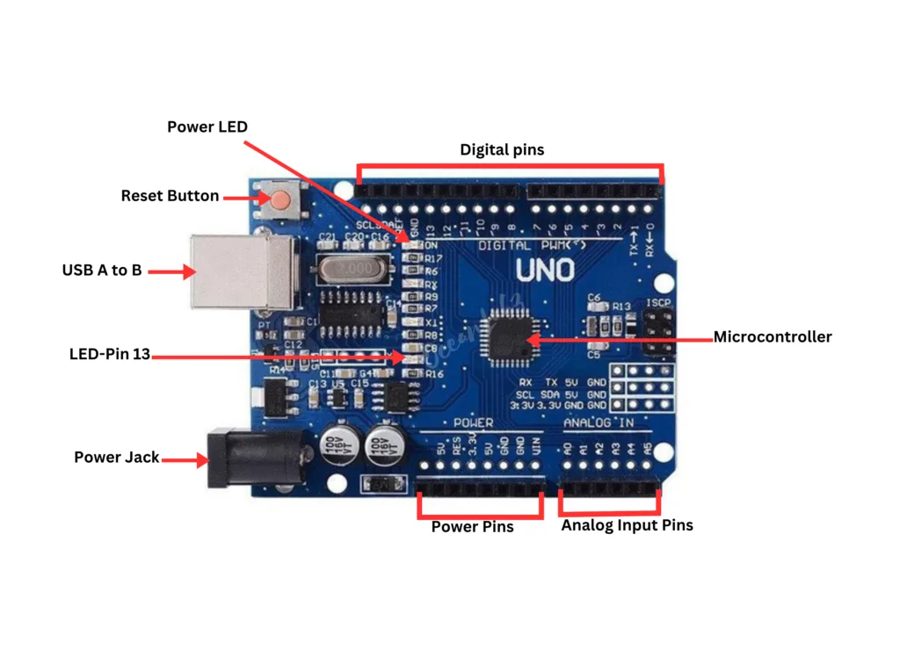
Arduino UNO board
ARDUINO UNO · LABELLED PINOUT
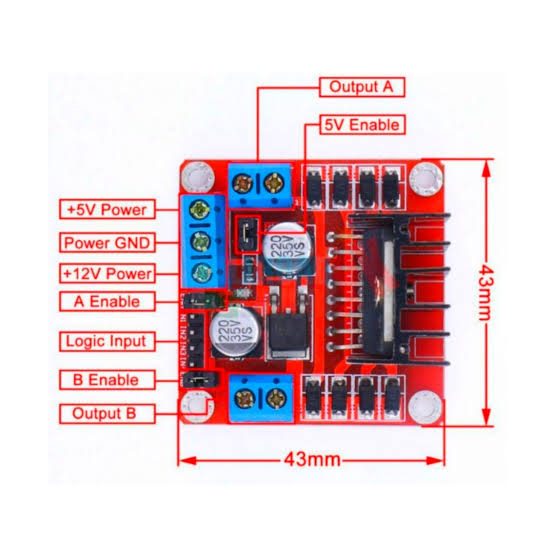
L298N motor driver
L298N MOTOR DRIVER · 43×43mm
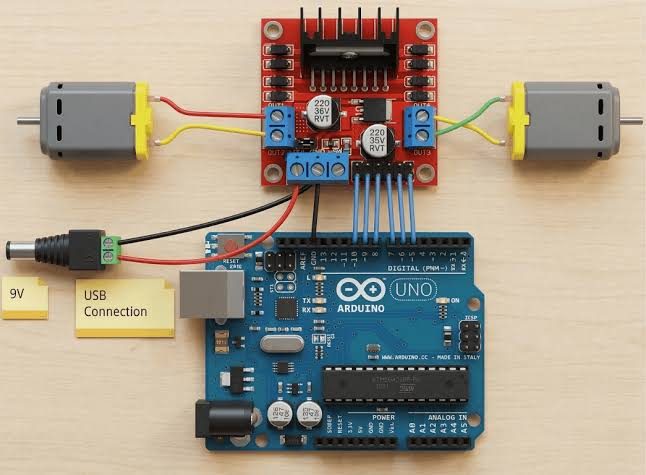
Full wiring diagram
FULL WIRING · ARDUINO + L298N + MOTORS
05 · Race Day

Build it → Race it → Win it

The last 15 minutes of the workshop is a timed obstacle course. Every team competes — fastest car with the fewest crashes takes the trophy. Here's how judges score it.

30%
Speed — fastest to finish
30%
Accuracy — fewest crashes
20%
Code quality — clean & commented
20%
Team spirit — helped each other

🏁 Race track layout

A figure-8 slalom with two checkpoints and a 30 cm-wide gate at the finish line.

START / FINISHCP 1CP 2🚗

🧠 Pro tips before the race

Tune your speed

Use the slider — not all 255. Medium PWM values (~160) are often faster around corners.

🔁

Test turns first

Drive in a figure-8 before the race. Asymmetric motor strength is the #1 cause of straight-line drift.

📡

IR angle matters

Point your remote at the receiver dome, not the side. Aim within 30° for reliable signals.

🧰

Tape the wires

A loose dupont wire during the race costs seconds. Tape down the ribbon before you start.

🧮

Add a brake command

Map one remote button to IN1=LOW, IN2=LOW, ENA=0. Clean stops win close races.

🏎️

Stagger your start

Press a button to start, not power-on — avoids false starts when everyone plugs in at once.

What you take home

More than just a car

You now know how to read sensors, drive motors with PWM, decode infrared signals, and write structured Arduino code. Every project idea on the board is buildable by you — today was just the beginning.

Next steps
  • Join IITSSpark Masters programme (ages 14–17)
  • Onlinearduino.cc/en/Tutorial/HomePage
  • Buy partsAny local electronics store or robu.in
  • Communityr/arduino — 1M+ makers ready to help